0 Member(s) | 195 Guest(s)
Applebot, Bing, Google
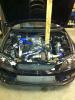
My New IS V8 Build
by Asi, 17-12-2017, 10:19 PM
well got back to today at 7 in the morning took a lot of brakes on the way back. Right so far the car sounds amazing and has few problems to sort out.
so phoned up Thor racing today for the adaption kit for the R154 gearbox to the 1UZFE and they said they have them in stock just the transmission bracket will be made end of February so i am going to order the gearbox on Monday so i get everything soon and the bracket will come later.
went down to the my cousin's garage called cruise motor sport. they have done a few conversions so far. they will be working on the car from now. the plans so far are to get the engine out the car because the manifold gaskets need to be changed and there is not enough clearance to get the manifold off and once the engine is out it would be easier to get the gearbox hooked up to it. the mechanic is also going to look over everything that has been done to the car so as far as i know everything is perfect. while the engine is out the battery is getting moved in the boot so its a side but at the moment the battery is sitting in the passenger side. then the ECU will go on and remapped once everything is mechanically working and fine thats when i am going to start working on the body work.
will keep everyone updated about everything .
have not got any pics just yet but will take some soon and post them up so people could see the car now.
My New IS V8 Build
by Asi, 17-12-2017, 10:19 PMAs most of you know that i have bought Marcus's V8 is200.
well got back to today at 7 in the morning took a lot of brakes on the way back. Right so far the car sounds amazing and has few problems to sort out.
so phoned up Thor racing today for the adaption kit for the R154 gearbox to the 1UZFE and they said they have them in stock just the transmission bracket will be made end of February so i am going to order the gearbox on Monday so i get everything soon and the bracket will come later.
went down to the my cousin's garage called cruise motor sport. they have done a few conversions so far. they will be working on the car from now. the plans so far are to get the engine out the car because the manifold gaskets need to be changed and there is not enough clearance to get the manifold off and once the engine is out it would be easier to get the gearbox hooked up to it. the mechanic is also going to look over everything that has been done to the car so as far as i know everything is perfect. while the engine is out the battery is getting moved in the boot so its a side but at the moment the battery is sitting in the passenger side. then the ECU will go on and remapped once everything is mechanically working and fine thats when i am going to start working on the body work.
will keep everyone updated about everything .
have not got any pics just yet but will take some soon and post them up so people could see the car now.
Accord In 5 years time ?!
by Saraj, 17-12-2017, 08:53 PM
Does that mean in 5 years time, you could buy this for about the same price?
http://www.autotrader.co.uk/classified/a...&logcode=p
 hock:
hock:
Accord In 5 years time ?!
by Saraj, 17-12-2017, 08:53 PMWith my brother picking up the Accord 54 plate for 4.5k
Does that mean in 5 years time, you could buy this for about the same price?
http://www.autotrader.co.uk/classified/a...&logcode=p
hock:

Wheels for an IS.
by Andy-R., 17-12-2017, 06:14 PM
Wheels for an IS.
by Andy-R., 17-12-2017, 06:14 PMOk guys what wheels other than Lexus will fit on an IS? for example I know the Mazda RX8 alloys will fit as Stav has them, so are there any others that will fit?

Anyone good with computers?
by micromarc, 17-12-2017, 06:08 PM
Before i install itunes again, need advice, i ve been told that when you install it again and connect your ipod back up it will wipe it. Is there a way round this or do i just have to deal with it and start again?
Anyone good with computers?
by micromarc, 17-12-2017, 06:08 PMI ve had to do a system restore on my girlfriends laptop. I backed everything up.
Before i install itunes again, need advice, i ve been told that when you install it again and connect your ipod back up it will wipe it. Is there a way round this or do i just have to deal with it and start again?

Nice bonnet for sale and some other parts
by Lexusboy, 17-12-2017, 05:24 PMNice bonnet for sale and some other parts
http://www.clublexus.com/forums/is300-cl...ost5096218
Lexus in Detroit
by Lexusboy, 17-12-2017, 05:14 PM
http://lexusenthusiast.com/2010/01/13/le...it-photos/
http://www.clublexus.com/forums/hs-250h-...salon.html
Lexus in Detroit
by Lexusboy, 17-12-2017, 05:14 PMDetroit for the North American International Auto Show 2010
http://lexusenthusiast.com/2010/01/13/le...it-photos/
http://www.clublexus.com/forums/hs-250h-...salon.html

Hdmi
by FirebirdPhil, 17-12-2017, 12:55 PM
Hdmi
by FirebirdPhil, 17-12-2017, 12:55 PMIf a broadcast is in NTSC but decoded in a sat. receaver and fed via a HDMI lead to the TV, will the image be viewable?

Need a new drill
by SHAHZ, 17-12-2017, 06:11 AM
http://www.screwfix.com/prods/59749/Powe...mbi-Drill#
Need a new drill
by SHAHZ, 17-12-2017, 06:11 AMAs the title says really, mine blew up a while ago......anyone got any recomendations ......seen this, apparently its made by makita so should be decent
http://www.screwfix.com/prods/59749/Powe...mbi-Drill#

TRC but not as you may know it?!!?
by is300_dino, 16-12-2017, 02:22 PM
Thanks
Dean
TRC but not as you may know it?!!?
by is300_dino, 16-12-2017, 02:22 PMyeah ok i been looking at banzai again, page 110 and page 111 is a product test for throttle response controllers. has anyone had any experience with these are they worthwhile on say my N/A is300? guru's enlighten me with your knowledge of these electrical gizmo's.
Thanks
Dean
Quick guide on using the forum Garage
by steviewevie, 16-12-2017, 09:22 AM
Use the "Garage" link up towards the top-left of the forum screen, between "User CP" and "FAQ", and you'll see the Garage.
You can add your car to the Garage by clicking on the "Add Vehicle" link. Once you've done that, click on the link with your vehicle name just below "Add Vehicle" - e.g. mine is called "1999 Lexus IS200", then you'll get a menu pop up, and one of the choices is "Add Modification".
You can then click on "Add Modification" and it should take you with another screen with lots to fill in. However, you can ignore most of the entries if you want. You do have to fill in the "Manufacturer" and "Product", and select a "Category". So click on the letter that the manufacturer of your mod starts with, e.g. "G" for "GReddy", and a list of manufacturers starting with that letter will appear in the Manufacturer box. Then click on the one that you want and a list of the products from that manufacturer should appear in the right-hand box.
If you are not sure of the manufacturer, e.g. a generic item from eBay, then you can always use the manufacturer "Other".
If the manufacturer isn't already in the database (but most common ones are), then if you are a paid Outlaw member, then you can add it yourself. To do that, you click on the "Not Listed?" link (under "Manufacturer") and fill in the "Business Name" and click on the "Add Business" button (you can ignore the other fields if you like). Then you'll be able to go back and pick it. If you're not a paid member, then please PM one of the moderators/admins to add it for you.
ok, so you've picked the manufacturer and clicked on it. Now you need to pick the name of the actual item/product. You may see a list of items from your manufacturer that are in the database already. If the one you want is already there, click on it then move on to the next bit (see below). If it's not there, then click on "Not Listed?" under "Product", enter the product name and click on the "Add Product" button.
ok, now on to the other fields. These are mostly optional and you can fill them in if you want, or just leave them blank. The other other field you do have to fill in is "Category", and if you click on the arrow next to "Select Category" you'll see a list and should pick the one that most closely fits the type of mod that you're entering (e.g. pick "Engine" for an engine mod).
Now you can either just click on the "Add Modification" button right at the bottom (you may have to scroll down), or you can add some pictures and then press that button. To add pictures you click on the "Browse" button next to the boxes where it says "You may add xx images ..." and that should bring up a window of the files of your computer, and you need to use that window to find where the picture is and double-click on it. Because of the way the Garage works, you have to load the pics up from your computer, you can't link to pics already on photo hosting websites (e.g. PhotoBucket).
You can do that for each one of your mods until you're done. Free members are limited to a maximum of three mods, but paid Outlaw members can add many more ! You can go back and edit a mod if you want to add more details later (e.g. price, purchase date) or to correct a mistake, or update the pic. If you want to edit a mod later on, then what you need to do is to select the "View Vehicle" option from the Garage menu, which will list all the mods etc. Scroll down to the mods and you should see on the right-hand side some icons - the one that looks like a spanner is the one to "Edit Modification." Through that one, you can change the details, and/or if you want to add/change the picture, then click on the "Images" tab at the top of the editing window.
Quick guide on using the forum Garage
by steviewevie, 16-12-2017, 09:22 AMShow off your car to other members !
Use the "Garage" link up towards the top-left of the forum screen, between "User CP" and "FAQ", and you'll see the Garage.
You can add your car to the Garage by clicking on the "Add Vehicle" link. Once you've done that, click on the link with your vehicle name just below "Add Vehicle" - e.g. mine is called "1999 Lexus IS200", then you'll get a menu pop up, and one of the choices is "Add Modification".
You can then click on "Add Modification" and it should take you with another screen with lots to fill in. However, you can ignore most of the entries if you want. You do have to fill in the "Manufacturer" and "Product", and select a "Category". So click on the letter that the manufacturer of your mod starts with, e.g. "G" for "GReddy", and a list of manufacturers starting with that letter will appear in the Manufacturer box. Then click on the one that you want and a list of the products from that manufacturer should appear in the right-hand box.
If you are not sure of the manufacturer, e.g. a generic item from eBay, then you can always use the manufacturer "Other".
If the manufacturer isn't already in the database (but most common ones are), then if you are a paid Outlaw member, then you can add it yourself. To do that, you click on the "Not Listed?" link (under "Manufacturer") and fill in the "Business Name" and click on the "Add Business" button (you can ignore the other fields if you like). Then you'll be able to go back and pick it. If you're not a paid member, then please PM one of the moderators/admins to add it for you.
ok, so you've picked the manufacturer and clicked on it. Now you need to pick the name of the actual item/product. You may see a list of items from your manufacturer that are in the database already. If the one you want is already there, click on it then move on to the next bit (see below). If it's not there, then click on "Not Listed?" under "Product", enter the product name and click on the "Add Product" button.
ok, now on to the other fields. These are mostly optional and you can fill them in if you want, or just leave them blank. The other other field you do have to fill in is "Category", and if you click on the arrow next to "Select Category" you'll see a list and should pick the one that most closely fits the type of mod that you're entering (e.g. pick "Engine" for an engine mod).
Now you can either just click on the "Add Modification" button right at the bottom (you may have to scroll down), or you can add some pictures and then press that button. To add pictures you click on the "Browse" button next to the boxes where it says "You may add xx images ..." and that should bring up a window of the files of your computer, and you need to use that window to find where the picture is and double-click on it. Because of the way the Garage works, you have to load the pics up from your computer, you can't link to pics already on photo hosting websites (e.g. PhotoBucket).
You can do that for each one of your mods until you're done. Free members are limited to a maximum of three mods, but paid Outlaw members can add many more ! You can go back and edit a mod if you want to add more details later (e.g. price, purchase date) or to correct a mistake, or update the pic. If you want to edit a mod later on, then what you need to do is to select the "View Vehicle" option from the Garage menu, which will list all the mods etc. Scroll down to the mods and you should see on the right-hand side some icons - the one that looks like a spanner is the one to "Edit Modification." Through that one, you can change the details, and/or if you want to add/change the picture, then click on the "Images" tab at the top of the editing window.